Loading index…
What’s New in MyChoreBoard: Progress Charts, Big Icons & a Smoother Experience

What’s New in MyChoreBoard: Progress Charts, Big Icons & a Smoother Experience

We’ve been busy behind the scenes making MyChoreBoard even more helpful for families.
This update adds two major new features — and a few invisible improvements — that make tracking chores and rewards simpler, clearer, and more fun for kids.

These improvements were all inspired by feedback from real MyChoreBoard families — parents who wanted clearer progress tracking, easier child views, and a smoother daily routine experience.

If you are new here, take a look at our The Ultimate Guide to Free Chore Apps.


New: Progress & Points Dashboard
Parent and child using a digital chore app together

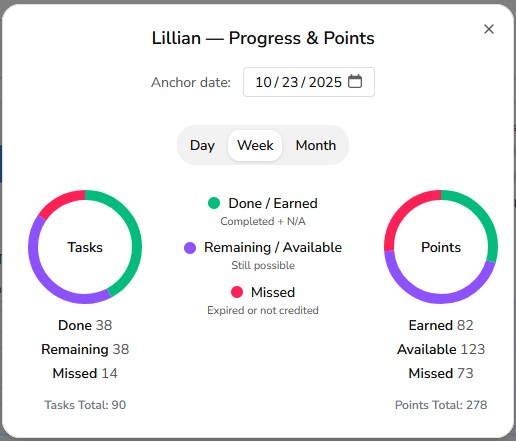
Parents and kids can now see at a glance how things are going with the new Progress & Points view.

Switch between Day, Week, and Month to visualize completed tasks, remaining opportunities, and missed points.
Each child’s chart updates automatically as chores are done (or skipped), so everyone knows exactly where they stand.

Highlights:

  • View daily, weekly, or monthly progress
  • See Done, Remaining, and Missed totals instantly
  • Separate pies for Tasks and Points
  • Smart color coding for quick scanning

Big Icons Mode settings in MyChoreBoard

Big Icon Mode (for Non-Readers)

Younger kids or early readers can now enjoy an easier-to-tap interface with Big Icons Mode.
Turn it on under Edit Child → Big Icons Mode to enlarge icons and touch targets — perfect for small hands.

Text stays the same size, but chores become bolder and more accessible.
Parents can customize this per child, so older siblings keep their normal view while younger ones get an easier one.


Small Fixes, Big Improvements

We also cleaned up a few edge-case bugs (the kind only developers lose sleep over).
These changes make chore tracking faster and more reliable, even in rare sync situations or when using MyChoreBoard offline.


Try It Out

Log in to your Parent Dashboard and:

  1. Open Assignments on your Parent Dashboard and tap the Progress Pie Chart to open their Progress & Points view
  2. Try switching between Day, Week, and Month
  3. If you have a younger child, toggle Big Icons Mode in Edit Child and see how it looks

We’re continuing to build MyChoreBoard with real families in mind — keeping it simple, flexible, and fun for kids of all ages.

Open MyChoreBoard to explore the new features today.


FAQ

  • The October 2025 update adds a Progress & Points dashboard, Big Icons Mode, and several background improvements to make daily routines smoother.
  • All families automatically — no app-store update needed. Just refresh or reopen MyChoreBoard to see the latest changes.
  • Open Assignments on your Parent Dashboard and tap the Progress Pie Chart. You can switch between Day, Week, and Month.
  • Go to Edit Child, then toggle Big Icons Mode on or off. It’s saved per child, so younger kids can have larger buttons while older kids keep the standard layout.
  • Yes. Whether you’re on a tablet, phone, or desktop, the new views and icon settings work automatically. Be online at least once to sync updates.

cta-image

Ready to try MyChoreBoard with your kids?

Install on any phone, tablet or computer. Free with no sign-in hoops.
Get Started Now
Available on Web iPhone & iPad Android

Related Posts

New Feature: Add Amazon Links to Specific Rewards

New Feature: Add Amazon Links to Specific Rewards

Rewards work best when kids know exactly what they are working toward. MyChoreBoard now lets parents add an Amazon link to a specific reward, making it easier to connect point

read more
Smarter Recurring Chore Scheduling

Smarter Recurring Chore Scheduling

Family routines are rarely as simple as “every day” or “every Monday.” Some chores happen every other day. Some happen every few weeks. Some only matter during certain seasons. So

read more
How Bonus Tasks Work in MyChoreBoard

How Bonus Tasks Work in MyChoreBoard

Required chores are important, but optional chores can be powerful too. That is why MyChoreBoard now includes Bonus Tasks — a separate area for extra chores kids can complete

read more
Chore App for Kids: Build Chores, Rewards, and Routines That Work

Chore App for Kids: Build Chores, Rewards, and Routines That Work

A good chore app for kids should do more than track who took out the trash. The real goal is bigger than that. Parents want kids to build responsibility, follow routines, hel

read more
Family Rollout Plan: Getting Kids Onboard with a Chore App

Family Rollout Plan: Getting Kids Onboard with a Chore App

Getting your kids excited about a new chore app isn’t just about tech — it’s about psychology. Families succeed when they roll it out with clear expectations, fun rewards, and a sh

read more
Focus Mode: Help Kids Complete Chores One Step at a Time

Focus Mode: Help Kids Complete Chores One Step at a Time

Some kids do great with a full list. Other kids see a full list and freeze. Focus Mode is built for the second group. With the latest MyChoreBoard update, Focus Mode helps kids m

read more
MyChoreBoard Is Now Available in the App Stores

MyChoreBoard Is Now Available in the App Stores

Installing MyChoreBoard just got easier. MyChoreBoard is now available in the app stores, giving families a more familiar way to install the free chore and rewards app on phon

read more
MyChoreBoard Settings: Small Customizations for Your Family

MyChoreBoard Settings: Small Customizations for Your Family

Most families start with the basics. Add your kids. Create a few chores. Set up some rewards. Let everyone start checking things off. That is usually enough to get started, but M

read more
New Feature: WallBoard Mode

New Feature: WallBoard Mode

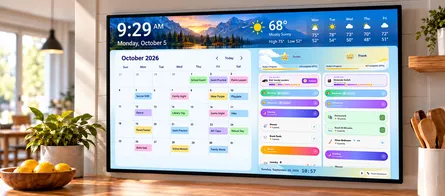
Sometimes it helps for the whole family to see everything at once. Instead of switching between child views, WallBoard Mode gives you a shared display that shows each child’s chore

read more
MyChoreBoard’s Biggest Update Yet: Bonus Tasks, Focus Mode, Smarter Scheduling, and More

MyChoreBoard’s Biggest Update Yet: Bonus Tasks, Focus Mode, Smarter Scheduling, and More

MyChoreBoard is now live in the app stores, and this is our biggest feature release since launch. After a few smaller updates, this release brings together several improvement

read more
New Feature: Invite Another Parent or Guardian

New Feature: Invite Another Parent or Guardian

Managing a household does not always fall on just one adult. Sometimes chores, rewards, routines, and responsibilities need to be managed by a co-parent, grandparent, guardian, or

read more
New Feature: Manually Add & Subtract Points

New Feature: Manually Add & Subtract Points

Not every important parenting moment shows up as a scheduled chore. Sometimes a child helps a sibling, puts in extra effort on homework, or handles a tough situation really well. O

read more
Make Rewards Feel Real: Add Photos to MyChoreBoard Rewards

Make Rewards Feel Real: Add Photos to MyChoreBoard Rewards

Kids stay motivated longer when they can see the reward they’re earning.That’s why we’re excited to introduce one of our most requested features:Add Images to Rewards

read more
How to Save MyChoreBoard to Your Home Screen and Use It Like an App

How to Save MyChoreBoard to Your Home Screen and Use It Like an App

A lot of parents hear the phrase Progressive Web App and assume it is something technical or developer-y. It is not. In real life, it simply means you can save MyChoreBoard t

read more
What Is a Shared Task Pool?

What Is a Shared Task Pool?

Some chores belong to one child. Others are more like open opportunities. That is where Shared Task Pool comes in. Shared Task Pool is part of Bonus Tasks in MyChoreBoard

read more
How to Switch from a Whiteboard to a Free Chore App (In One Weekend)

How to Switch from a Whiteboard to a Free Chore App (In One Weekend)

If your whiteboard chore chart is covered in half-erased checkmarks and good intentions, you’re not alone. Most families outgrow paper systems once routines start to slip or multip

read more
More Enhancements: Category Filters, Quick Assign & 24-Hour Clock

More Enhancements: Category Filters, Quick Assign & 24-Hour Clock

The big features get the attention, but small setup improvements often make the biggest difference day to day. This MyChoreBoard update includes several parent-facing improvements

read more
ADHD and Household Responsibilities: What Parents Should Know

ADHD and Household Responsibilities: What Parents Should Know

Why Chores Matter for ADHD Kids If asking your ADHD child to “clean your room” ends in frustration, you’re not alone. Household chores can feel like an uphill battle—but they’r

read more
How Chore Apps Can Help ADHD Kids Build Routines & Confidence

How Chore Apps Can Help ADHD Kids Build Routines & Confidence

When ADHD Turns Routine Into a Daily Battle Parenting a child with ADHD can feel like running a marathon that resets every morning. You start hopeful, but by lunchtime the chec

read more
Morning Routines for ADHD Kids That Actually Work

Morning Routines for ADHD Kids That Actually Work

Why Mornings Feel So Hard for ADHD Families If your mornings feel like a race you never signed up for, you’re in good company. Many parents describe ADHD mornings as “organized

read more
Reward Systems That Motivate ADHD Kids (Without Bribes or Battles)

Reward Systems That Motivate ADHD Kids (Without Bribes or Battles)

Why ADHD Motivation Works Differently Parents often say, “My child can focus — just not on chores.”That’s not inconsistency; it’s neuroscience. ADHD isn’t a lack of willpo

read more
Why Visual Cues Help ADHD Kids Stick to Routines

Why Visual Cues Help ADHD Kids Stick to Routines

Why Visuals Are a Game-Changer for ADHD Routines If you’ve ever told your ADHD child, “Go get ready,” only to find them 15 minutes later still in their pajamas building a LEGO

read more